參考:
link: https://blog.logrocket.com/type-html-faster-react-emmet-vs-code/
Enabling Emmet in Visual Studio Code for React
Step 1: Open settings.json in VS Code
To open the setting.json file, you first have to open the User Settings page by typing Ctrl + , if you’re on Windows or ⌘ + , if you’re on a Mac:
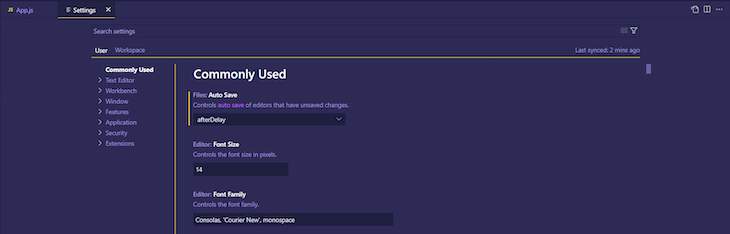
In the User Settings page, click on the new file icon in the top right corner of the page:

Step 2: Configure the settings.json
From the settings.json file, you’ll be able to see the different configurations that are already set for your IDE. To enable Emmet in VS Code for React, we’ll add the following code:
"emmet.includeLanguages": {
  "javascript": "javascriptreact",
  "typescript": "typescriptreact"
}
转载请注明来源,欢迎对文章中的引用来源进行考证,欢迎指出任何有错误或不够清晰的表达。可以邮件至 kimfei2014@gmail.com